
News
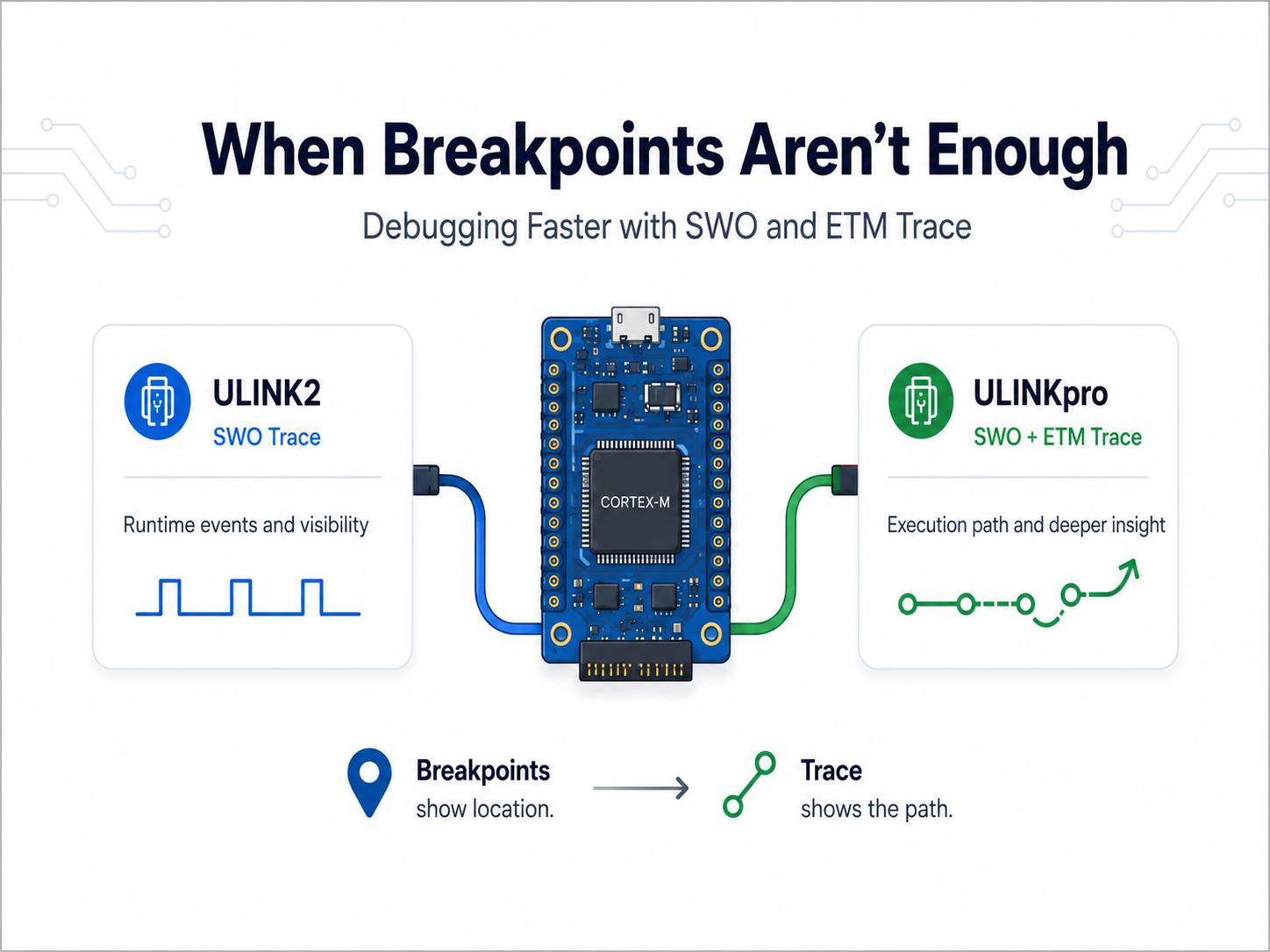
When Breakpoints Aren’t Enough: Debugging Faster with ULINKpro Trace
Most embedded developers are familiar with the usual debugging cycle: set a breakpoint, stop the processor, inspect the problem, make a change, and try again. That works well until the problem depends on timing, interrupts, RTOS task interaction, DMA, communication traffic, or a failure that only occurs occasionally. At that point, stopping the processor can sometimes hide the very problem you are trying to find. This is where trace can make a significant difference. See More Than the Current Breakpoint A debugger such as Keil ULINK2 provides SWD/JTAG debugging together with Serial Wire Viewer (SWV), giving developers runtime information such as events, exceptions, data activity, and program-counter sampling. But SWV is still only showing selected information about what happened. With ULINKpro and ETM instruction trace, the debugger can capture the processor's actual execution history and reconstruct the instructions and code paths that were executed. Instead of reaching a fault and asking: “Why did my software end up here?” you can trace backwards through the execution sequence that led to it. For complex embedded systems, that difference can dramatically reduce the amount of trial-and-error debugging required. Why ULINKpro? ULINKpro combines traditional debugging with high-speed SWV and ETM instruction trace of up to 800 Mbit/s on supported Cortex-M devices. It can also stream trace directly to the host computer, allowing much longer trace sessions. That gives engineering teams several practical advantages: Find intermittent faults faster by examining what happened before a crash or HardFault. Debug without constantly stopping the processor, helping preserve real-time behaviour. Follow complex execution paths across functions, interrupts and application logic. Identify performance bottlenecks using execution profiling. Generate code-coverage information during testing. Capture longer scenarios instead of repeatedly trying to reproduce the issue. For example, a normal debugging session might tell you that the processor reached HardFault_Handler(). ETM trace can help reveal the sequence behind it: Task → ProcessPacket() → Interrupt → Buffer Access → Invalid Pointer → HardFault That extra context can turn repeated breakpoint placement into a much more focused root-cause investigation. ULINK2 or ULINKpro? For everyday firmware development, ULINK2 remains a capable debugger and provides SWV trace for runtime visibility. ULINKpro becomes valuable when simply knowing the current state is no longer enough. ULINK2 helps you see what the system is doing. ULINKpro can help you understand how the system got there. For RTOS applications, communication stacks, interrupt-heavy firmware, and timing-dependent failures, that execution history can significantly shorten the path from “we reproduced the problem” to “we found the root cause.” ETM trace does require support from the target processor and the appropriate trace connections on the hardware, but when available, ULINKpro provides a level of visibility that traditional stop-and-go debugging cannot.
Learn more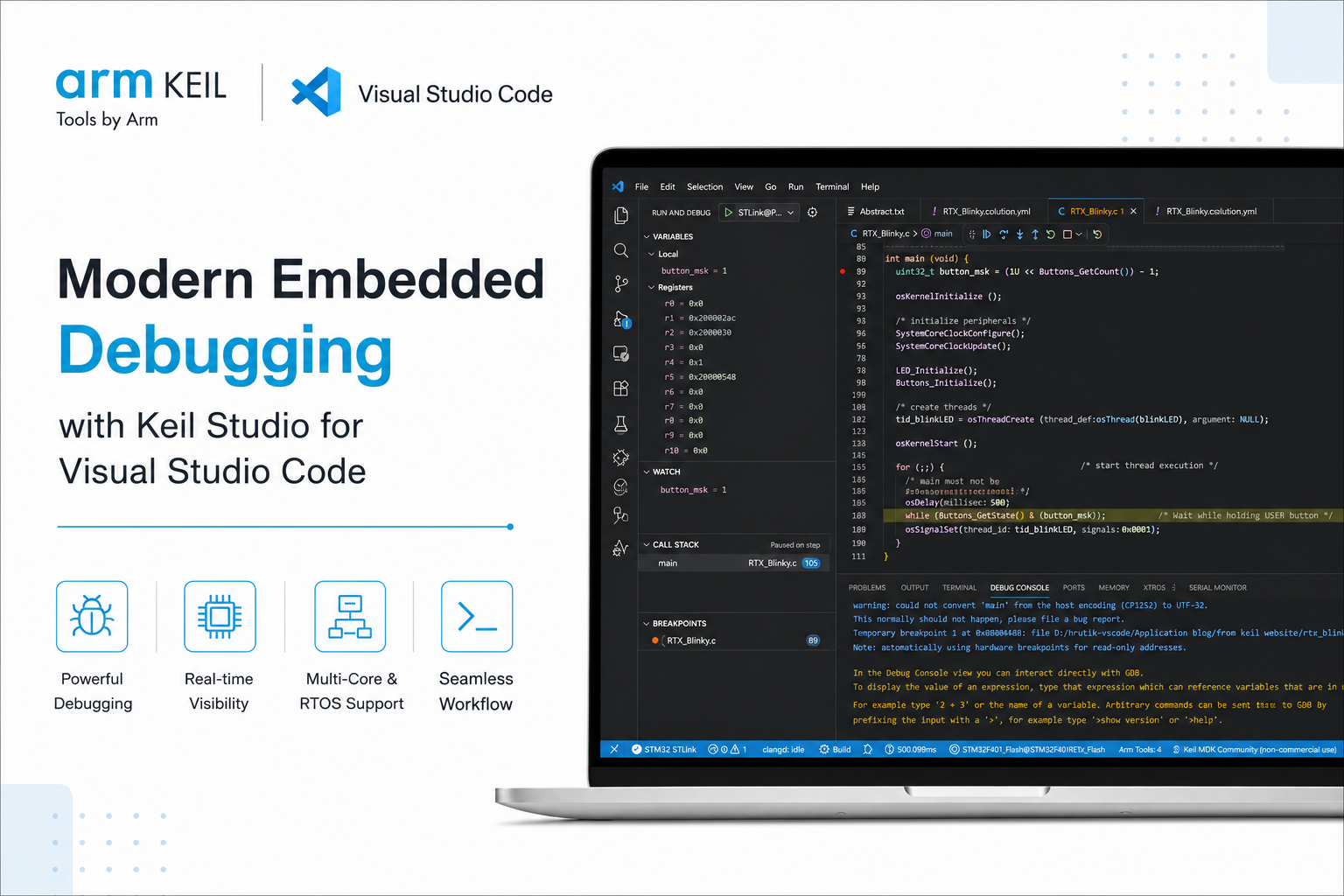
Modern Embedded Debugging with Keil Studio for Visual Studio Code
Visual Studio Code has rapidly become a preferred development environment for embedded software, and many engineering teams are now looking beyond editing and building firmware. The Arm Keil Studio extensions bring professional embedded debugging directly into VS Code, allowing developers to build, flash, and debug firmware from a single workspace while continuing to use familiar Keil tooling. For teams already using Keil uVision, supported projects can be imported as CMSIS Solutions, providing a practical path toward adopting Visual Studio Code without sacrificing the debugging experience many developers already rely on. Once a project is built, supported debug probes such as ST-LINK, CMSIS-DAP, and J-Link are automatically detected, allowing firmware to be downloaded and debugged directly from the editor. The integrated Run and Debug (1) view brings together everything required during a debug session. Developers can inspect local and global variables, monitor custom expressions through the Watch window, review the current execution path using the Call Stack, and manage active breakpoints without switching between multiple tools. For RTOS-based applications, thread-aware debugging also provides visibility into active tasks, making it easier to understand scheduling and runtime execution. The Debug Toolbar (2) provides quick access to the controls used throughout a debug session, including Continue, Pause, Step Over, Step Into, Step Out, Restart, and Disconnect, allowing developers to move through program execution with precision while investigating firmware behavior. The Trace and Live View (3) extends the debugging experience by providing access to Live Watch, Component Viewer, and Core Peripherals from a single workspace. Live Watch continuously updates selected variables during execution, while the peripheral views provide direct access to hardware registers, making it easier to correlate firmware behavior with the underlying hardware. The integrated timing indicator (4) provides execution timing information during a debug session, helping developers monitor elapsed execution time while validating time-sensitive firmware behavior. Meanwhile, the Debug Console (5) enables direct interaction with the underlying GDB session, allowing expressions to be evaluated, debugger commands to be executed, and diagnostic information to be reviewed without leaving Visual Studio Code. Beyond the primary debugging workspace, the Keil debugger also provides several embedded-specific views that simplify firmware analysis. Peripheral View allows developers to inspect MCU peripheral registers in real time, while Memory Inspector supports configurable memory layouts, address navigation, multiple display formats, and direct memory editing when required. Additional tools such as Serial Monitor and Live Watch provide continuous visibility into UART output and application variables, allowing software behavior to be observed alongside hardware state during development. Beyond the standard debugging workflow, the Keil Studio debugger also supports Multi-Core Debugging and RTOS Views. Multi-Core Debugging enables developers to work with multiple processor cores from a single debug session, while RTOS Views provide insight into running threads, priorities, stack usage, and task states for supported real-time operating systems. As Visual Studio Code continues to become the IDE of choice for embedded software development, debugging no longer needs to remain tied to traditional IDEs. The Keil Studio extensions combine a modern development experience with familiar Keil debugging capabilities, allowing embedded developers to adopt a modern workflow without compromising the tools they depend on.
Learn more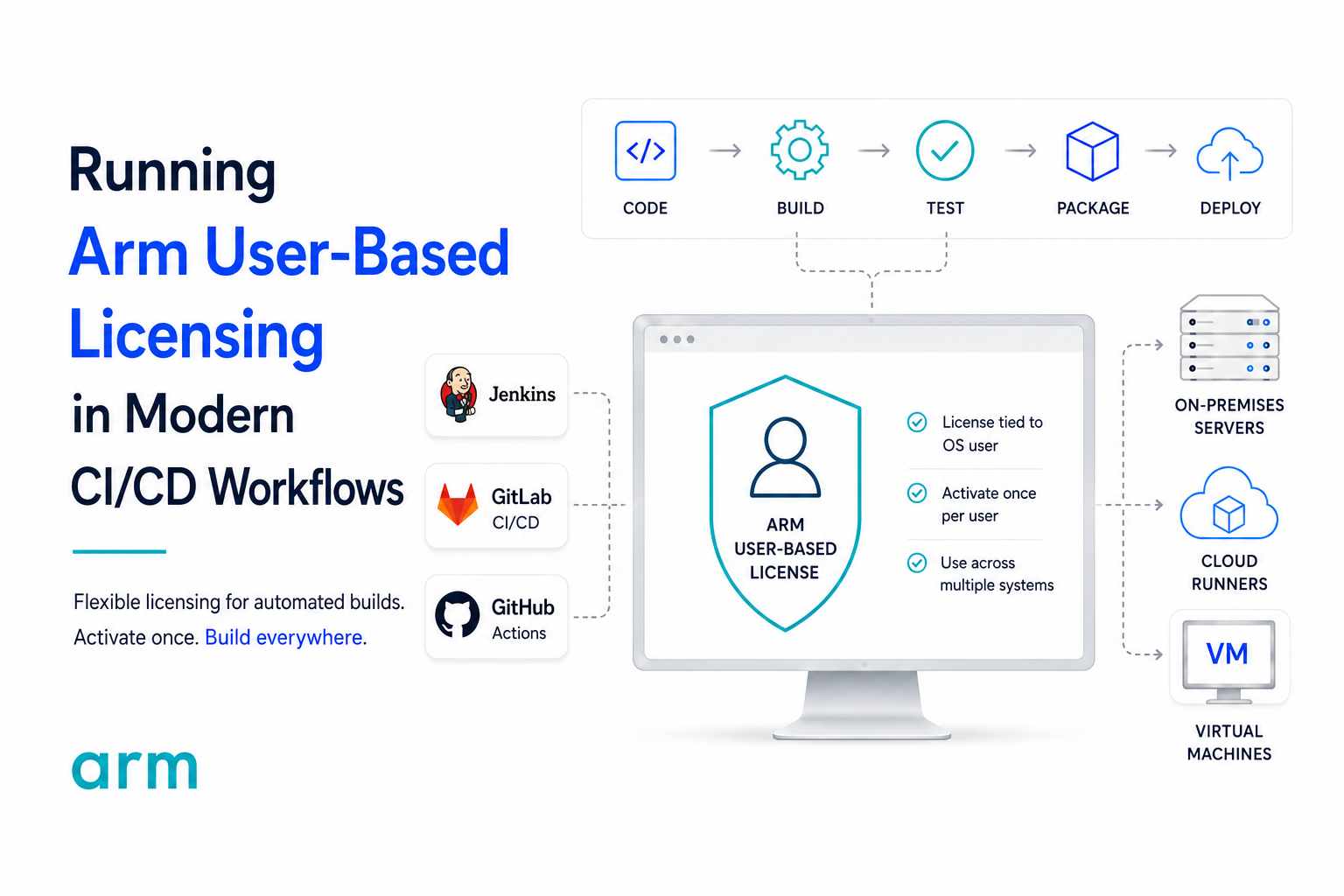
Running Arm User-Based Licensing in Modern CI/CD Workflows
Modern embedded software development no longer ends at a successful local build. Firmware is now continuously compiled, tested, analyzed, and packaged through automated pipelines running on Jenkins, GitHub Actions, GitLab CI, Azure DevOps, and dedicated build servers. While these environments simplify software delivery, they also introduce a practical question for many engineering teams: How should commercial embedded development tools be licensed within an automated build environment? Unlike traditional node-locked licensing, Arm User-Based Licensing (UBL) associates the license with the operating system user executing the Arm development tools rather than a specific machine. This model fits naturally into modern CI/CD infrastructure where build servers, virtual machines, and cloud runners are regularly created, replaced, or scaled without requiring licensing to be tied to individual hardware. A common deployment pattern is to provision a dedicated Windows build runner using a service account such as jenkins, builduser, or gitlab-runner. The UBL license is activated once under that operating system account, allowing every pipeline executed by the same user to access the licensed Arm Compiler or Keil MDK installation without requiring interactive activation during each build. This separation between the CI platform and the licensing mechanism is important. GitHub Actions, Jenkins, or GitLab simply schedule the build; the Arm development tools validate the licensed operating system user at runtime. Once the environment has been provisioned, the licensing process becomes transparent to the pipeline itself, allowing engineering teams to focus on build automation rather than license management. Containerized environments introduce another consideration. UBL identifies the effective operating system username inside the container rather than the Docker host. If a build container executes as root, the licensing system also identifies the user as root. For dedicated CI runners this is a supported deployment model, provided the license is activated for that shared build account. For developer-specific containers, Arm recommends using individual usernames so each engineer's license remains associated with their own environment rather than every user appearing as root. Many engineering organizations also maintain products developed with older Arm and Keil toolchains while introducing modern CI practices. Rather than maintaining separate licensing strategies, Professional UBL licenses can generate compatible node-locked licenses for supported legacy tools including Arm Compiler 5, PK51, PK166, and DK251. Arm also provides unattended installation methods together with command-line licensing utilities, allowing legacy projects to be provisioned automatically as part of a build server image or virtual machine deployment instead of requiring manual IDE configuration. As build infrastructure grows, another common question is whether every virtual machine requires its own license. In practice, the answer depends on how the build environment is deployed. Because UBL licenses the operating system user rather than the hardware, organizations commonly create dedicated build identities that can be reused across multiple build servers and virtual machines. For larger deployments, environments with restricted internet connectivity, or enterprise-scale infrastructure, Arm additionally supports Proxy Activation and Local License Server (LLS) workflows to simplify license management while reducing repetitive online activation requests. For teams designing reproducible CI infrastructure, Arm also recommends automating the provisioning process. Installing the required toolchain version, activating the build account once, and scripting the remaining environment configuration allows new build runners to be deployed consistently across physical servers, virtual machines, or cloud-hosted infrastructure. This approach minimizes manual configuration while ensuring every runner behaves identically, an important requirement for deterministic embedded software builds. User-Based Licensing is ultimately designed to complement modern embedded software development practices rather than constrain them. Whether firmware is being compiled on a local build server, a virtual machine, or a cloud-hosted CI runner, UBL provides a licensing model that aligns with automated software delivery while remaining compatible with both current Arm development tools and many existing legacy projects. As engineering organizations continue investing in DevOps and continuous integration, licensing becomes another component of the build infrastructure one that can be provisioned, automated, and managed alongside the rest of the development environment rather than treated as a separate administrative task. If you'd like to explore specific deployment scenarios in greater detail, Arm provides several excellent technical articles covering User-Based Licensing in automated development environments. Further Reading from Arm Documentation: Legacy Keil tools installation and automating UBL registration for CI environments (GitHub Actions, GitLab Runners, and build servers) Running Keil MDK build tools in Windows Docker containers, including supported configurations, limitations, and licensing considerations Understanding User-Based Licensing (UBL) behavior in Docker containers running as root, including licensing implications and recommended deployment practices If you'd like to discuss your CI/CD environment, migration strategy, or User-Based Licensing deployment, feel free to reach out Hrutik Champaneri at hrutik.champaneri@joraltechnologies.com
Learn more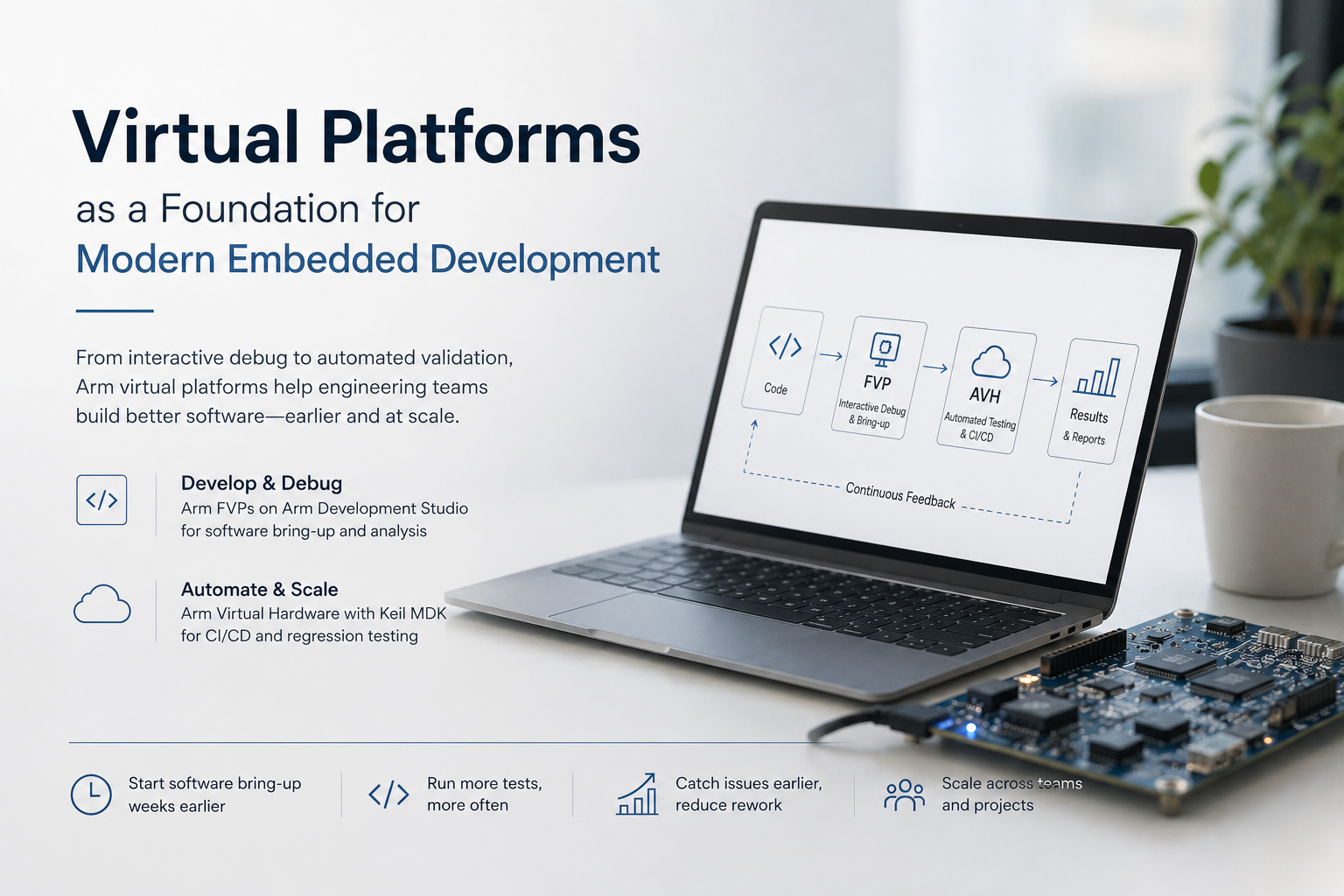
Virtual Platforms as a Foundation for Modern Embedded Development
Modern embedded software development is no longer limited to writing code and waiting for a physical target. As engineering teams adopt CI/CD pipelines, distributed development, and parallel hardware-software workflows, virtual platforms have become an increasingly important part of the embedded software lifecycle. Rather than simply replacing physical hardware, virtual platforms allow software bring-up, debugging, regression testing, and continuous validation to begin earlier while providing a repeatable and scalable execution environment. At the core of these solutions is Arm Fast Models, the simulation technology used to build functionally accurate virtual representations of Arm-based systems. Fixed Virtual Platforms (FVPs) are ready-to-run virtual systems built using Fast Models, providing software developers with complete simulation environments for debugging and software bring-up. Arm Virtual Hardware (AVH) builds upon these virtual platforms by integrating them into a broader ecosystem that supports cloud execution, CI/CD pipelines, automation, and scalable software validation. For Cortex-M software development, Arm Virtual Hardware, available with Keil MDK Professional, enables engineering teams to execute software in virtual environments without relying on physical evaluation boards. Instead of maintaining dedicated hardware for every developer or CI server, teams can automatically build, execute, and validate firmware locally or in cloud-based pipelines. This allows more frequent regression testing, faster feedback on every code change, and better utilization of engineering resources while reducing dependence on shared development hardware. For more complex Cortex-A, Cortex-R, and system-level software development, Fixed Virtual Platforms (FVPs) available with Arm Development Studio provide functionally accurate models for software bring-up and interactive debugging. Developers can inspect memory, debug drivers, validate boot sequences, and analyze software behavior using familiar Arm Development Studio tools, allowing much of the early integration effort to begin in a virtual environment before transitioning to physical validation. Although they are often mentioned together, AVH and FVPs are designed for different purposes. FVPs provide the virtual targets that developers use for software development and debugging, while AVH extends those capabilities into a scalable development ecosystem by integrating virtual targets with cloud infrastructure, DevOps workflows, and CI/CD automation. Rather than competing technologies, they complement one another one focuses on interactive software development, while the other enables automated software validation at scale. While Arm Development Studio includes a broad range of pre-built FVPs, organizations developing custom silicon can use the Arm Fast Models Library and System Generator (SG_Simulator) to create platform-specific virtual models, allowing software bring-up and validation to begin on architectures that do not yet exist as standard reference platforms. As embedded systems continue to increase in complexity, virtual platforms are becoming more than just simulation tools. They are helping engineering teams improve software quality, increase testing frequency, reduce hardware dependencies, and build modern embedded development workflows that scale from a developer's desktop to enterprise CI/CD environments. Interested in learning more about Arm Virtual Hardware, Fixed Virtual Platforms (FVPs), or Arm Development Studio? Contact Hrutik Champaneri at hrutik.champaneri@joraltechnologies.com. Watch our Arm Virtual Hardware video here
Learn more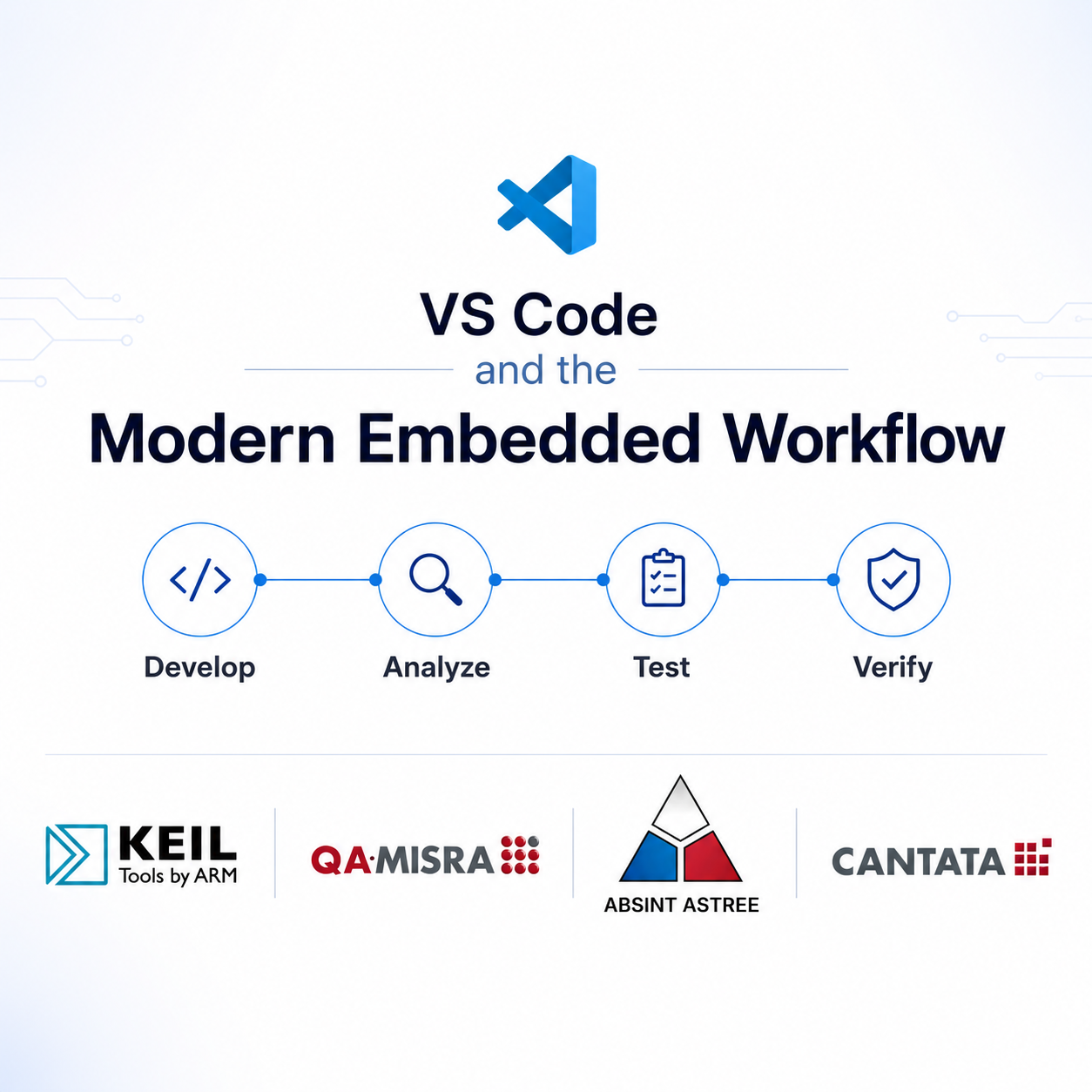
VS Code and the Modern Embedded Workflow
Visual Studio Code has become a preferred development environment for many embedded software teams thanks to its flexibility, lightweight design, and extensive extension ecosystem. However, as embedded projects grow in complexity, writing code is only part of the challenge. Teams must also ensure software quality, compliance, test coverage, and verification while still meeting aggressive release schedules. The challenge is that many of these activities are still performed later in the development lifecycle, where defects become significantly more expensive to resolve. Industry studies have shown that software defects discovered during integration or system testing can cost up to 10x more to fix than those identified during development. For this reason, many organizations are shifting verification activities earlier in the software lifecycle to reduce project risk, improve quality, and avoid costly rework. Rather than forcing developers to abandon their preferred development environment, a modern VS Code-based workflow allows quality and verification activities to be integrated directly into day-to-day development. Developers can use Keil MDK to build and debug Arm Cortex-M applications while continuing to work within a familiar VS Code environment. Powered by Arm Compiler and the CMSIS ecosystem, Keil MDK provides optimized code generation, comprehensive device support, and advanced debugging capabilities specifically designed for Arm-based systems. This enables teams to accelerate development while building on a trusted toolchain widely used across safety, industrial, automotive, and IoT applications. Coding standards compliance is often another source of engineering effort, particularly for projects operating under safety, security, or regulatory requirements. QA MISRA helps identify coding standard violations as code is written, allowing issues to be corrected before formal reviews begin. Organizations that introduce coding standards verification earlier in development often report reduced review effort, improved code consistency, and fewer compliance related surprises during audits and certification activities. With the QA·MISRA extension integrated directly into VS Code, developers can identify violations and receive feedback within the editor, helping them address issues before they become larger development or compliance challenges. Static analysis provides another opportunity to identify defects before they become schedule impacting problems. AbsInt Astrée analysis tools help detect runtime anomalies, stack usage concerns, and software defects before code reaches target hardware. Finding issues during development rather than during integration testing can substantially reduce debugging effort while improving software reliability and reducing verification risk. Similar to QA MISRA, Astrée integrates with VS Code and highlights analysis results directly within the development environment, enabling engineers to identify and resolve issues earlier in the software lifecycle. Verification through testing remains equally important. QA Systems Cantata enables automated unit and integration testing for C and C++ applications, helping teams continuously verify functionality throughout development. Studies have shown that automated testing can reduce manual test execution effort by 30–50% while improving repeatability, coverage, and traceability. For organizations operating in regulated industries, automated testing also helps generate evidence required for standards such as ISO 26262, IEC 61508, IEC 62304, and DO-178C. With Cantata's VS Code integration, developers can generate test cases, execute tests, and review code coverage directly within their development environment, helping teams build quality into the software lifecycle from the start. Modern development workflows increasingly rely on CI/CD pipelines to improve efficiency, consistency, and software quality. VS Code integrates seamlessly with source control and automation platforms, making it easier to manage branches, reviews, builds, testing, and deployments. When combined with tools such as Keil MDK, QA·MISRA, AbsInt, and Cantata, teams can automate quality checks, compliance verification, static analysis, compilation, and testing throughout the development lifecycle. This unified workflow improves traceability, strengthens collaboration between development and quality teams, and helps identify issues earlier, reducing the risk of costly late-stage defects while providing greater confidence that software meets quality, security, and compliance requirements before release. Together, VS Code, Keil MDK, QA MISRA, AbsInt, and Cantata support multiple stages of the embedded software V-model from implementation and debugging through compliance, static analysis, testing, and verification. The result is not simply better tooling, but a more predictable development process, fewer escaped defects, reduced rework, and higher confidence in software quality before release. Interested in learning how these tools can fit into your development workflow? Reach out to Hrutik Champaneri at hrutik.champaneri@joraltechnologies.com to discuss your project requirements, compliance goals, or embedded software development challenges. Explore our VS Code Ecosystem page to discover tools for embedded development, static analysis, MISRA compliance, automated testing, and CI/CD integration, all within a modern VS Code workflow.
Learn more
ARCHITECTURE OF TRUST: STRENGTHENING SECURITY IN MODERN CORTEX-M SYSTEMS
As embedded devices continue to expand into connected and safety-critical applications, security has become a fundamental design requirement rather than an optional feature. From industrial controllers and medical devices to automotive and IoT systems, developers must address increasingly sophisticated threats while maintaining performance and reliability. Modern Arm Cortex-M processors have evolved significantly to meet these challenges. While earlier Cortex-M architectures provided strong performance and low-power operation, newer generations introduce hardware enforced security features designed to protect software, data, and system resources from both accidental faults and malicious attacks. One of the most significant advancements is TrustZone for Arm Cortex-M, which enables the separation of applications into Secure and Non-Secure environments. By isolating sensitive assets such as cryptographic keys, authentication services, and security-critical firmware, TrustZone helps reduce the attack surface and limits the impact of compromised software components. Recent Cortex-M architectures further strengthen security through features such as Stack Limit Registers, PAN (Privileged Access Never), PXN (Privileged Execute Never), Pointer Authentication and Branch Target Identification (PACBTI), enhanced Memory Protection Unit (MPU) capabilities, and secure gateway mechanisms. Together, these technologies help mitigate common attack vectors including stack overflows, code injection, privilege escalation, control-flow hijacking, and cross-domain attacks. These hardware assisted protections are particularly valuable as embedded systems become increasingly connected and exposed to external threats. Security mechanisms that were once implemented primarily in software can now be enforced directly by the processor, improving both robustness and system resilience. As cybersecurity requirements continue to evolve, modern Cortex-M security features provide developers with practical tools to implement a defense in depth strategy. By combining hardware isolation, memory protection, privilege controls, and control-flow integrity mechanisms, organizations can build more secure and trustworthy embedded systems for the next generation of connected devices. To learn more about the security features discussed in this article, watch the full webinar here.
Learn more
New Arm Product Updates Available
New Arm Product Updates Available The following products have been updated: Product Code Product Version ACOMP616 Arm Compiler for Embedded FuSa 6.16LTS r6p16-03rel0 This release adds download packages for Arm Certified C Library 6.16.A. It does not include any changes to the Arm Compiler for Embedded FuSa 6.16.3 toolchain, Arm Certified C++ Library 6.16LTS, or Arm Certified C Library 6.6.B download packages. Arm Compiler for Embedded FuSa 6.16.3 was released on 16 January 2026. It is a qualified release suitable for use for projects with functional safety or long-term maintenance requirements. For more information, see the Release Notes available via developer.arm.com/documentation.
Learn more
New Arm Product Updates Available
Dear customer, The following products have been updated: Product Code Product Version DEVST-GLDF Development Studio UBL Gold FUSA r25p1-00rel0 This release of Arm Development Studio includes the next-generation Arm Toolchain for Embedded Professional (ATfEP) in addition to Arm Compiler for Embedded 6 (AC6). Please be aware that consequently Development Studio installation time has significantly increased on Windows. For convenience of Windows users, we provide two installation packages, one that incudes ATfEP and one that does not include ATfEP. We are working to reduce the Windows installation time in future releases. Did you know you can simulate and configure IP in Arm IP Explorer? Get started today.
Learn more
New Arm Product Updates Available
The following products have been updated: Product Code Product Version DEVST-GLD0 Development Studio UBL Gold r25p0-00rel0 This release of Arm Development Studio includes the next-generation Arm Toolchain for Embedded Professional (ATfEP) in addition to Arm Compiler for Embedded 6 (AC6). Please be aware that consequently Development Studio installation time has significantly increased on Windows. For convenience of Windows users, we provide two installation packages, one that incudes ATfEP and one that does not include ATfEP. We are working to reduce the Windows installation time in future releases. DEVST-GLDF Development Studio UBL Gold FUSA r25p0-00rel0 This release of Arm Development Studio includes the next-generation Arm Toolchain for Embedded Professional (ATfEP) in addition to Arm Compiler for Embedded 6 (AC6). Please be aware that consequently Development Studio installation time has significantly increased on Windows. For convenience of Windows users, we provide two installation packages, one that incudes ATfEP and one that does not include ATfEP. We are working to reduce the Windows installation time in future releases. DS000B Arm Development Studio r25p0-00rel0 This release of Arm Development Studio includes the next-generation Arm Toolchain for Embedded Professional (ATfEP) in addition to Arm Compiler for Embedded 6 (AC6). Please be aware that consequently Development Studio installation time has significantly increased on Windows. For convenience of Windows users, we provide two installation packages, one that incudes ATfEP and one that does not include ATfEP. We are working to reduce the Windows installation time in future releases.
Learn more
EMBEDDED IS EVERYWHERE

PRODUCTS
Manufacturers
Resource center